The Software Engineering Practice series of articles
focuses on how software is collaboratively developed in real engineering projects.
This article mainly introduces how to use Git to support the whole development flow.
outline
This article includes:
- operation: keep team operations consistent
- commit: commit atomic code
- history: keep a linear clean history
- release: follow a scientific release standard
- tool chain: build a self-consistent toolchain
- gitlab/github: use modern development platforms
- ci/cd: let the system control code quality
- sentry/k8s: connect the whole system with versions
- conclusion
operation: keep team operations consistent
Git provides a free and powerful API,
we can use it to complete code collaboration in all kinds of postures.
But as the saying goes,
more choices, more confusion. There isn’t really such a saying
So in team collaboration,
keeping operations consistent is very important.
commit: commit atomic code
The smallest unit of Git is a commit.
The best practice our team follows is to keep each commit atomic:
One commit does one thing.
For example, a commit about a bug fix can be very simple,
with only two lines:
one line fixes the code logic,
one line adds a unit test.
Another refactor commit may change 200+ files,
but because it does only one thing,
it doesn’t burden code review.
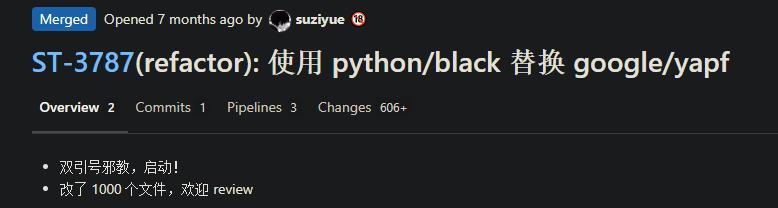
Atomic commits not only well support the series of native Git commands like revert/cherry-pick/bisect,
but are also crucial in keeping the history linear and clean.
history: keep a linear clean history
As time goes on,
each Git commit grows into a lush, leafy history tree.
Fast forward-based merging keeps Git’s history tree clean and linear.
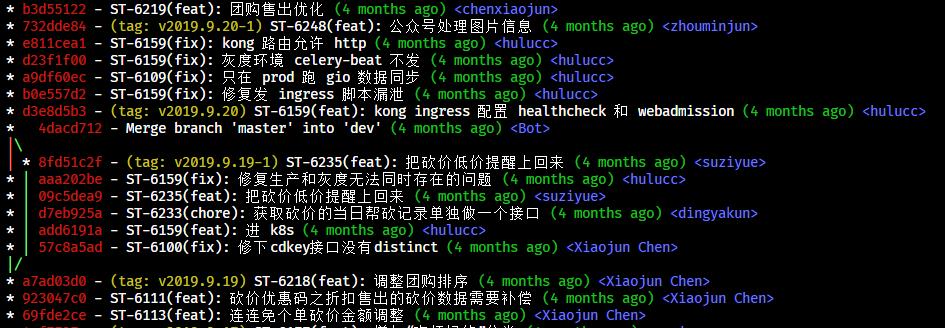
This is a screenshot of our project’s git log scrolled four months back,
you can see the history is still linear and clean.
Linear history means each person rebases before committing code.
One exception is after submitting a hotfix on the release branch (master),
merging back to the dev branch may require turning off fast forward (–no-ff) depending on the situation.
Plus requiring everyone to rebase puts certain demands on team members’ Git skills and merging habits.
A clean history requires everyone to strictly follow commit atomicity,
and to write commit messages according to standard.
About writing commit messages,
teacher Ruan has a 《commit message guide》 that’s good enough.
We can also enable commit message validation in git hooks
to ensure consistent formatting.
Through fast forward merge + unified commit message,
we can maintain a constantly growing yet clean linear history tree,
maximally facilitating all kinds of git version operations.
release: follow a scientific release standard
We use git tag as the marker for version releases.
Because our project is a web service-side project,
we basically only need to maintain the latest version at any given moment,
so we use date-based version numbers (v2019.9.9).
In most open-source tools,
semantic versioning (semver: v2.0.0) is used.
Based on atomic commits and linear history,
on each release,
we automatically generate tag/changelog.

A tag following good standards maximally leverages the toolchain’s integrations,
providing complete functionality for development, testing, deployment, and monitoring.
tool chain: build a self-consistent toolchain
In software engineering that emphasizes team collaboration, development process, and release quality,
there’s a series of dev tools around the Git history tree,
providing a self-consistent toolchain.
gitlab/github: use modern development platforms
We use GitLab to manage code projects,
and heavily use Merge Request as the carrier for code review.Though we follow GitHub’s convention and call it PR (Pull Request)
To maintain PR atomicity,
in most cases we follow one commit per PR,
which makes both review and branch management easier.
But this dev flow produces a lot of PRs,
requiring team developers to stay in a more active dev state.
Modern dev platforms also integrate more workflow features,
we also heavily use GitLab Runner as our ci/cd carrier.
ci/cd: let the system control code quality
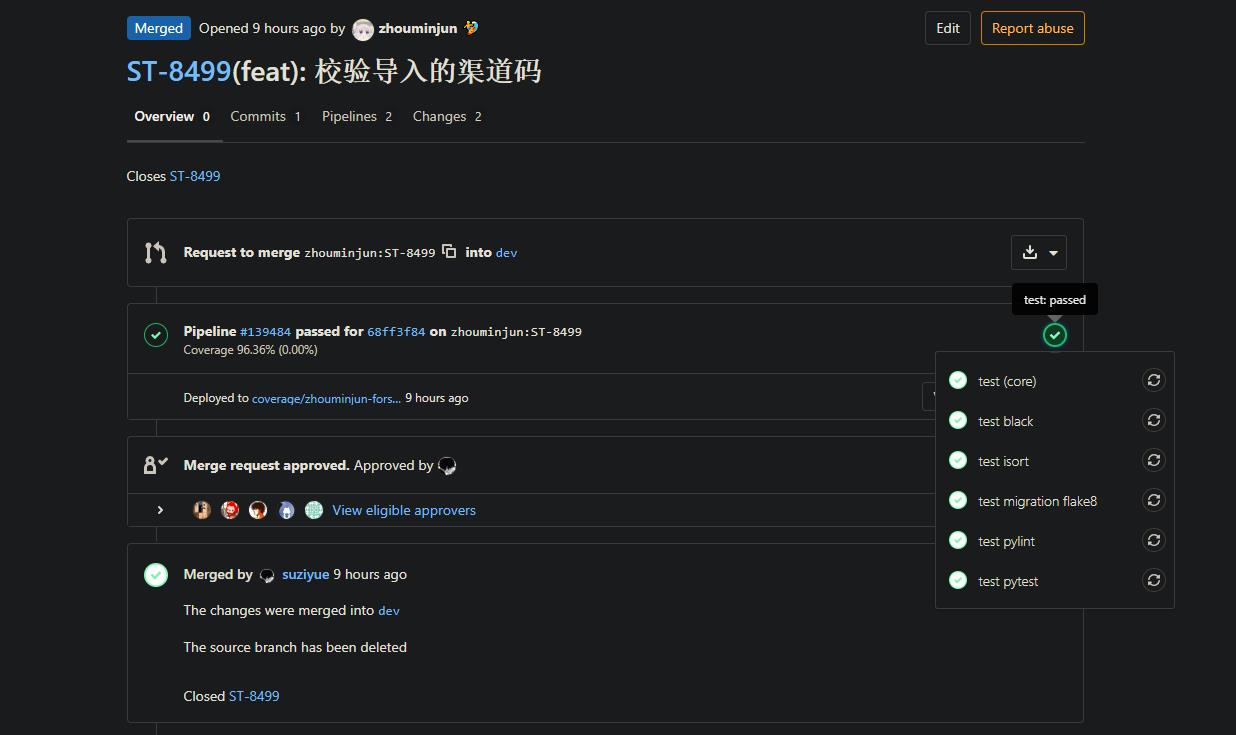
After submitting a PR,
the system automatically runs a series of Python/Django checks.
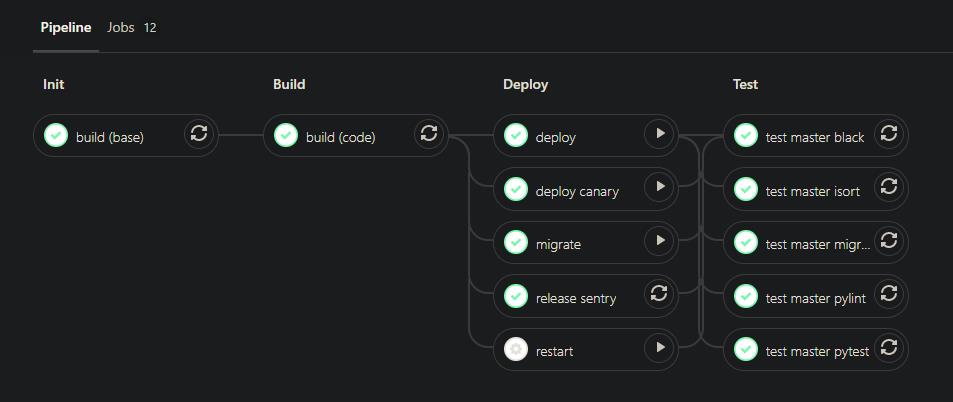
After releasing a version via git tag,
the system automatically runs build, canary, and deployment tasks.
Aside from GitLab Runner,
others like Jenkins/Travis CI/GitHub Actions can do similar ci/cd functions.
Integrating ci/cd makes the whole dev flow smoother,
letting the impact of each change show in real-time data.
ci/cd plus code review
maximally keeps the codebase active,
avoiding “piling poop on the poop mountain” long-term.
I mentioned earlier our PR/release frequency is high,
so ci/cd also needs to complete in shorter time
to avoid mental collapse and skip ci from sluggish detection.
Currently our project averages within 5min for multiple checks including 96% coverage unit tests,
and also within 5min for the whole release flow from build, canary, to full deployment.
The whole ci/cd flow is actually similar to writing business APIs,
it needs continuous iteration, continuous optimization, continuous adaptation to better dev flows.
sentry/k8s: connect the whole system with versions
After the dev flow ends,
software engineering also cares about the release flow and quality control flow.
We bind docker image tag with git tag,
so each version finally deployed on k8s is strongly tied to the git tag version.
Under this setup,
operations like kubectl rollout are linked to the Git history tree.
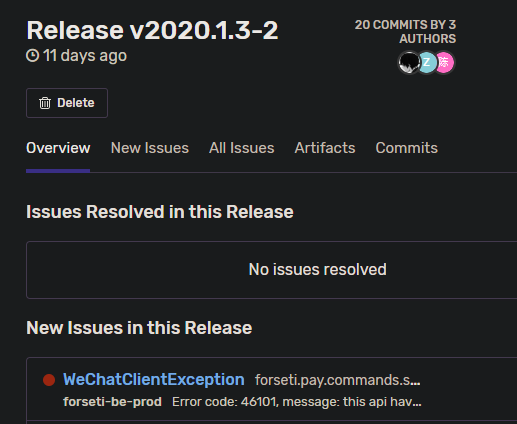
We also use sentry to detect and manage online code issues.
All external systems use the unified tag version to link issues,
giving us a unified engineering language for debug, history tracing, and blame-assigning.
conclusion
Git-based dev flow is not an immutable framework,
it varies in expression based on project traits, team member habits, and toolchain.
In our team’s software engineering practice,
we maintain this set of dev standards:
- Keep commits atomic, one commit does one thing.
- Follow standards for writing commit messages, and pay attention during code review.
- Unify team members’ operation habits, use rebase + fast forward merge.
- Automatically generate git tags and changelogs, and do code releases based on them.
- Build a fast, comprehensive ci/cd flow, automatically run all code checks.
- Keep the dev flow consistent with community best practices, understand and use integration features of various tools.
This dev flow also poses these challenges:
- Need certain Git knowledge, including advanced knowledge like history tree operations.
- Besides during coding, also keep an active attitude during collaboration, plus a high standard for collaboration.
- Most importantly, the pursuit of best practices and the attitude of “if you don’t know, you can learn.”
This Git dev flow ultimately brought these effects:
- Linear history makes debug, tracing changes, and understanding project development very friendly.
- The project can stay actively fast-developing on one hand, while ensuring long-term maintenance quality on the other.
- Discussion and iteration on best practices keeps a great engineering culture in the team.
In software engineering practice,
a good Git dev flow is indispensable.
In the future we’ll share more software engineering practices from different angles.
(End)