As a programmer,
“unscientific” things often happen in daily development.
And such times are great opportunities for “case cracking”:
let us use science to explain the unscientific.
Setup
Just another ordinary day.
The programmers seated in a row were clacking away at code.
Imperceptibly the deadline crept closer.
Thinking of this,
everyone tensely clacked at code even harder.
Suddenly, Boss Xu furrowed his brow, sensing things weren’t simple:
“I keep feeling that Sentry’s response speed has slowed down these past few days.”
Sentry, the English word directly translates to sentinel (one of the strongest in the Marvel universe).
It’s also a very handy exception monitoring/collection/management software.
The official site is sentry.ioOur company uses Sentry for error collection across all ends.
Everyone’s developed the habit of looking at the Sentry stack first to assign blame when an error occurs.
So Ziyue routinely glanced at the Sentry Stats,
and Ziyue thought it was simple:
“Boss La, take a look at your push system!”
Boss La, nickname derived from his ID: lxkaka.
Because he looks just like our payment vendor Lakala (lakala).Boss La does backend at our company,
responsible for member data, platform monitoring, push system implementation.
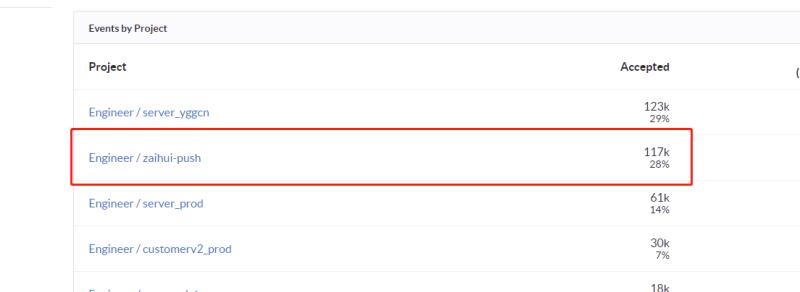
Coming over and looking at the Sentry Stats data on Ziyue’s screen,
Boss La felt confused:
“That shouldn’t be. How could the push system throw this many errors?”
Development
Back at his seat, Boss La researched for a while,
and exclaimed:
“Did we change the test environment’s MongoDB address?”
Boss Xu’s face full of disdain:
“Didn’t change it. If we did it was two months ago.”
Ziyue laughed and teased Boss La:
“Wouldn’t be that your code has been broken for two months without anyone noticing, right?”
Boss La quickly said:
“No way, no way, let me look again.”
Ten minutes later,
Boss La stood up with double-confused face,
and very puzzledly pub’d a sentence:
“This is unscientific, the test environment is fine.”
So everyone got together
and laid out the currently known facts:
- Sentry is constantly receiving errors from the test environment’s push system (zaihui-push).
- The error message is that the MongoDB connection address is wrong.
- We changed the test environment’s MongoDB two months ago.
- But at the code level, the test environment is using the correct MongoDB config.
In other words:
we thought our code was correct,
but the monitoring observed the code throwing errors continuously!
This was very (un)scientific.
So we decided to crack the case.
First, Boss La verified the correctness of the test environment.
He shut down all the push system Docker containers,
but Sentry kept receiving errors.
This means the error source is not the test environment.
Junru pointed out that Sentry might be able to see the source IP.
So Ziyue tried observing,
no IP was found, but they observed the Server Name.
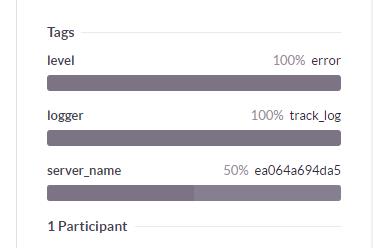
ea064a694da5 — this 12-character hex number is a typical Docker Container ID!
So everyone immediately thought of the brute-force solution:
find all Docker Container IDs on the internal network.
Our company’s test/production environments are both on the internal network.
You can only ssh to machines through the gateway machine.
For ease of ops,
internal network machines all have names configured in ssh config.
So Ziyue ran a bash script on the gateway machine
to find all Docker Container IDs on the internal network:
cat ~/.ssh/config | grep -G '^Host' | cut -d' ' -f2 | xargs -I{} ssh {} "docker ps" >> dockers_container.log
After the command finished,
we opened the output file,
and excitedly discovered:
the error source is NOT on the internal network!
Turn
The situation suddenly froze.
Everyone’s leads went off in several directions:
- Can we simulate MongoDB’s address, then packet-capture the requests?
- Can we dig out the IP address from the Sentry info?
- Can we find the corresponding machine through the Docker Container ID?
After thinking,
everyone concluded the key to cracking the case lies in the entire network call:
we just have to retrace the server’s network relationships and call paths,
and we’ll find the break-the-case point!
The problem was suddenly localized to the internal Load Balancer.
Our company separates the production environment from internal systems (like GitLab/Sentry, etc.)
Similar to the production gateway machine,
the traffic entry for our internal systems is also an nginx we set up ourselves.
So we logged into the internal system’s nginx,
found the nginx access log.
The whole file had about 100k lines.
...
42141 59.78.3.25 - - [22/Mar/2018:22:09:07 +0800] "POST /api/450/store/ HTTP/1.1" 200 41 "-" "raven-python/6.3.0" "-"
42142 59.78.3.20 - - [22/Mar/2018:22:09:07 +0800] "POST /api/355/store/?sentry_version=7&sentry_client=raven-js%2F3.22.3& HTTP/1.1" 200 41 "Mozilla/5.0 (Linux; Android 8.0; DUK-AL20 Build/HUAWEIDUK-AL20; wv) Mobile Safari/537.36 MicroMessenger/6.6.5.1280" "-"
42143 59.78.3.24 - - [22/Mar/2018:09:33:08 +0800] "POST /api/452/store/ HTTP/1.1" 400 62 "-" "SharpRaven/2.2.0.0" "-"
...
Another problem arose:
how do we, in these tens of thousands of differently-shaped log lines,
find which one is the push system’s error,
and thus find the error source IP?
We can do it through the Sentry Endpoint,
or through Raven’s version.
For instance, the three log entries above
are Python/JavaScript/C# respectively sending error info to Sentry.
The push system uses the package [raven==6.3.0][ravern],
so we sifted out the real IP:
59.78.3.25!
(This IP has been censored)
Everyone got so excited they stood up.
Because it wasn’t his push system environment misconfig wok,
Boss La also let out his relief / pour-oil-on-fire shout:
“Case cracked! Case cracked! Look who this IP belongs to!”
Conclusion
Looking it up online,
we found this IP is in Shanghai.
Junru suspected:
“Wouldn’t this just be our office’s outgoing traffic IP?”
So we checked our current outgoing IP:
> curl -s httpbin.org/ip
{
  "origin": "59.78.3.25"
}
The air went quiet for a moment,
because the current facts were:
- Boss La confirmed his developed push system had no errors.
- Tracing it back, the error source is in our office.
- The error source is hiding in someone’s computer’s docker.
So the question is:
who exactly would clone the push system code,
and run it in docker on their own computer?
That could only be the developer Boss La himself.
Everyone gathered behind the tense Boss La,
watching him type docker ps:
> docker ps
CONTAINER ID        IMAGE           ...
ea064a694da5        zaihui-push     ...
Case cracked!
Boss La thought about it and guessed:
he probably debugged the push system locally a few days ago,
and forgot to shut it down.
Was it really a few days ago, as he claimed?
Everyone opened Sentry:
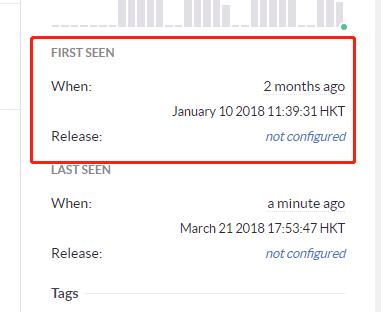
The data mercilessly revealed the truth:
the errors started two months ago,
which, by Boss Xu’s memory,
was when we switched the test environment’s MongoDB.
Seeing that in the end it was Boss La’s own computer that caused the mess,
everyone burst out laughing,
and Boss Xu also teased Boss La in passing:
“Your Mac is awesome too, running several dockers without lagging.”
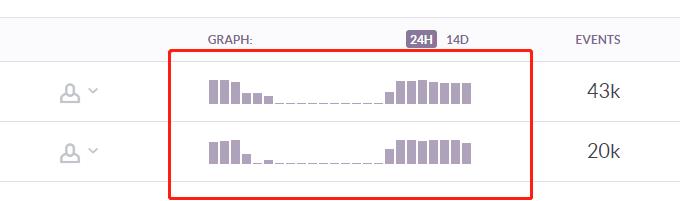
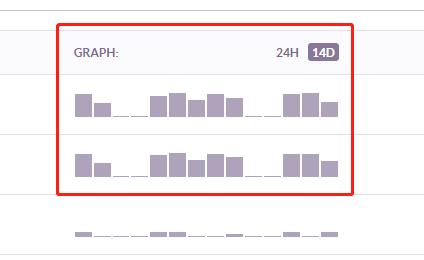
Later looking at Sentry’s error frequency chart,
everyone laughed at Boss La crazily once more:
“Boss La, this Sentry error pattern starts early at 10, ends late at 8, five days on, two days off,
really reflects your work hours~”
At the end of the matter,
Ziyue dug out the “Pull” and “Push” door handle labels from Boss Liu’s desk,
and put them on Boss La’s desk:
“Boss La, well, after this battle,
you’re also our Boss Push now.”
(End)