This article mainly describes the tools used in the code release workflow at my company
(a growing startup).
Release tool: Jenkins
The release tool we use is Jenkins, which many companies are using.
To give a chestnut picture as an example,
on the Jenkins Server we can release backend server code with one click:
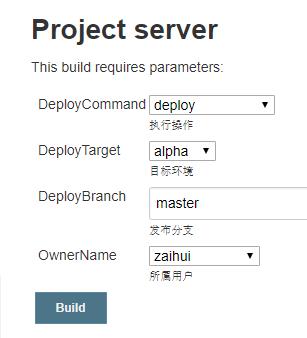
After pressing the Build button,
the following happens:
- On the Jenkins server, a pre-configured Bash script is triggered
- git commands fetch the latest code version, switch to the appropriate branch
Run code style checks and unit testssince we started using the paid version of GitLab, this function has been switched to GitLab CI- After security checks pass, use the fab command to deploy the code
Release command: Fabric
The fab command here uses Python’s Fabric library.
This library is similar to ansible,
and mainly contains two sets of functions:
Local command integration.
This has a similar function to Java’sant,gradle,
or JS’snpm run.
They can all integrate several operations into a simple workflow command.Remote ssh tool.
Fabric is based on ssh,
and implements a convenient set of remote command interfaces.
For example, this piece of code can upload configurations to a remote server:
from fabric.api import *  # NOQA

# Don't bother trying, both domains here are fake. Just plug in your ssh host/user.
env.hosts = ['www.kezaihui.com', 'zaihuiwebserver-814613977.cn-north-1.elb.amazonaws.com.cn']
env.user = 'saber'

def update_supervisor_config():
    put('./supervisor/*.conf', '/etc/supervisor/conf.d/', use_sudo=True)
    run('supervisorctl update', use_sudo=True)
But Fabric has a rather annoying issue: it only supports Python2.
If you want to use Python3,
you can use Fabric’s fork branch Fabric3.
Fabric3 is mostly functionally equivalent to Fabric.
If you only want the local command integration part of the functionality,
there’s another library called Invoke that provides similar functionality.
This library is mainly impressive in its name —
Dota 2’s Karl is also called Invoker.
Process management: Supervisor
In production environments,
to ensure the robustness of server processes,
we use supervisor to monitor process status.
A simple nginx supervisor config will look like this:
[program:nginx]
command=/usr/sbin/nginx
autostart=true
autorestart=true
stdout_logfile=/var/log/supervisor/nginx.log
stderr_logfile=/var/log/supervisor/nginx_error.log
After putting the config file at /etc/supervisor/conf.d/nginx.conf,
you can use a series of commands to bring the service up:
$ supervisorctl update  # supervisorctl is supervisor's CLI tool, refresh the config
nginx    STARTING    pid 1000, uptime 0:00:00

$ supervisorctl status  # check process status
nginx    RUNNING     pid 1000, uptime 0:12:34

$ kill -9 1000  # simulate various disturbances by killing the nginx process

$ supervisorctl status  # check process status again, you can see supervisor auto-restarted it
nginx    STARTING    pid 1020, uptime 0:00:00
Summary
The engineer responsible for releasing,
may have only clicked one Build button on the page.
But the actual flow is like this:
- Jenkins triggered the configured Bash script.
- Inside the Bash script, the fab command was run.
- The fab command executed the code upload work, essentially executing commands over ssh.
- Finally supervisor started/restarted the process service.
- Release complete.
The above is roughly my company’s current crude introduction to deployment automation.
The upgrade road is long,
there’s still a lot to learn / practice / master.
Original link, author @Lirian Su
Copyright belongs to the Zaihui R&D team. Reprinting is welcome, please retain the source.