If you also don’t mind sitting at the bottom of the hierarchy of contempt,
then let’s exchange notes on how to set up a Windows development environment.
The Bottom of the Hierarchy of Contempt: Windows
The hierarchy of contempt is a real part of a programmer’s daily life.
For example, take classic programming languages.
There’s a saying that goes:
C engineers look down on C++ engineers,
C++ engineers look down on Java and C# engineers,
Java engineers and C# engineers look down on each other.
Engineers writing static languages look down on engineers writing dynamic languages.
Engineers using Python 3 look down on engineers still using Python 2,
Engineers using Python 2 look down on engineers who hit UnicodeEncodeError.All engineers look down on PHP engineers.
And in terms of operating systems used,
the hierarchy of contempt basically goes:
Engineers using Mac OS X look down on engineers using Linux,
Engineers using Linux look down on engineers using Windows.
That said,
I still really like the Windows development environment.
The main reason is: I can play games…
Although nowadays I almost never play,
but this can play games unlimited possibility deeply attracts me…
o(〃’▽’〃)o
So we’ll go through a series of steps
to set up the most comfortable Windows development environment! and gaming environment
Essential Software
There are a few pieces of software I consider essential in a Windows dev environment.
Chocolatey
Chocolatey is a command-line package manager on Windows.
Not official,
but very easy to use.
Open cmd.exe as administrator and run one line of command to install successfully:
@powershell -NoProfile -ExecutionPolicy Bypass -Command "iex ((New-Object System.Net.WebClient).DownloadString('https://chocolatey.org/install.ps1'))" && SET "PATH=%PATH%;%ALLUSERSPROFILE%\chocolatey\bin"
Once installed, one line of command installs commonly used software
and configures the Path environment variable:
choco install -y 7zip everything git jdk8 nodejs npm python2 putty vagrant virtualbox vim wox
The only downside is the installation is silent with default values,
so if some software needs to disable right-click menus
or be put in a specific folder, you’ll have to set that up yourself.
Wox
That’s the wox that the previous choco command installs at the end,
a quick app launcher tool.
If you know Spotlight or Alfred on Mac OS,
wox is their Windows version.
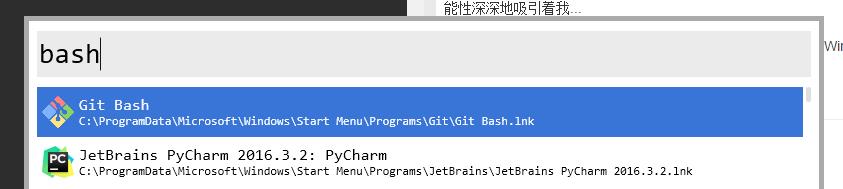
For example, on any interface,
after I press the Alt + Space shortcut,
a white input box pops up.
After I type the program name and hit enter,
the program automatically opens.
wox supports wildcards,
supports search,
supports system operations (like lock screen, restart),
and with everything added it supports file search.
Git Bash
What I’m talking about here isn’t Git, but specifically Git Bash.
Git Bash is a terminal software based on mingw (MINimal Gnu for Windows) that gets installed alongside Git.
It comes with Linux command-line tools like bash / ls / find / grep / wc,
supports .profile for custom environment variables,
supports git file status display.
With this I basically haven’t used cmd or powershell anymore.
My Preferences
The three pieces of software above I strongly recommend.
Below are some with a certain level of,
or strong, personal taste.
VirtualBox + Vagrant + Putty: For normal development, I usevagrant init ubuntu/trusty64 && vagrant upto start an Ubuntu VM, then use Putty to connect, treating this VM as a complete Server. VirtualBox is the VM container, similar to VMware but with a more lenient license. Vagrant is the VM management software, providing data communication between host and VM, and some automated tasks. Putty is the classic remote terminal software.JetBrains full suite, including IntelliJ IDEA, PyCharm, Rider EAP, ReSharper: After all JetBrains is a commercial company that makes IDEs. They’re still better than some open source IDEs. For example, their IDEs basically don’t have Issues unresolved for 10 years…NetEase Cloud Music + Youdao Dictionary + Youdao Cloud Note: Uh, not sure how to introduce these. It’s pretty literally I just need these things. Coffee and music are programmers’ good friends. I don’t really drink coffee, I only have music.everything: a super fast super easy-to-use global Windows search tool, efficiency comparable to the Linuxlocatecommand.Vim, on Windows it's GVim: God of editors.
Other Tips
- Left-ear Mouse’s advice: be an eco-friendly programmer, starting with not using Baidu
- Besides
Alt + F4, Windows shortcutsWin + E,Win + R,Win + D,Win + L,Win + Tabare also very useful. - You can use
left-click select in terminalto copy,Shift + Insertto paste. - The Windows equivalent of
lnismklink <dest> <source>. For directories add the parametermklink /d <dest> <source>. - If you use Vim, remap your
<Caps Lock>key to<Ctrl>. - Some configurations used in this article can also be found in my config project on GitHub.