My current dev environment uses Vagrant to start a VM, then Putty to connect to it, doing daily development work with VIM.
But one day after updating some configs, when I typed 1 on the numpad in VIM, VIM would add a q character on the previous line, which confused me.
Later, after googling this problem, I learned that I just needed to disable Putty’s Application keypad mode.
A Strange Error
When the numpad input first started diverging from expectations, I was really confused.
First, the numpad worked normally in Bash, so my keyboard was fine, must be something wrong in VIM.
Second, I pressed 1, and out came a q on the previous line. I pressed 2, and out came r on the previous line.
If the keyboard had no problem, to implement this kind of “feature” yourself in VIM, you’d need a config line:inoremap <Num1> <Esc>Oq
But that’s just too weird, how could VIM possibly replace <Num1> with something weird like <Esc>Oq?
Seeking the Answer
So I found an answer on the VIM wiki
According to this explanation, the problem is with Putty.
Putty enables “Application Keypad Mode” by default. When this option is enabled,
all keys on the numpad (including
| Original Key | Generated Sequence |
|---|---|
<Num1> | <Esc>Oq |
<Num2> | <Esc>Or |
<Num3> | <Esc>Os |
<Num4> | <Esc>Ot |
<Num5> | <Esc>Ou |
<Num6> | <Esc>Ov |
<Num7> | <Esc>Ow |
<Num8> | <Esc>Ox |
<Num9> | <Esc>Oy |
<Num0> | <Esc>Op |
. | <Esc>On |
/ | <Esc>OQ |
* | <Esc>OR |
+ | <Esc>Ol |
- | <Esc>OS |
<Enter> | <Esc>OM |
So <Num1> really does turn into <Esc>Oq!
Looking up Putty’s docs on Application keypad mode:
Application Keypad mode is a way for the server to change the behaviour of the numeric keypad
Hmm, okay, it’s a config decided by the server side.
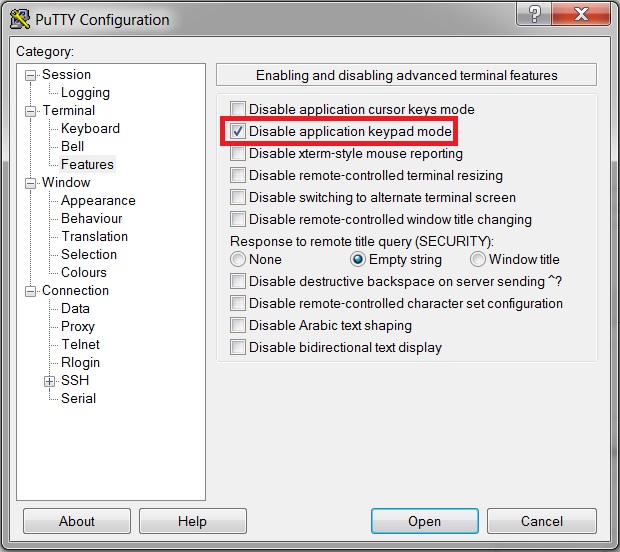
So the simple solution under Putty is to turn off this mode:
- Open Putty config
- Select Terminal -> Features on the left
- Tick “Disable application keypad mode”
- Select Session on the left
- Save Putty config
More Strange Answers
In the VIM wiki page’s discussion section, someone gave a solution that looks quite dumb:
:inoremap <Esc>Oq 1
:inoremap <Esc>Or 2
:inoremap <Esc>Os 3
:inoremap <Esc>Ot 4
:inoremap <Esc>Ou 5
:inoremap <Esc>Ov 6
:inoremap <Esc>Ow 7
:inoremap <Esc>Ox 8
:inoremap <Esc>Oy 9
:inoremap <Esc>Op 0
:inoremap <Esc>On .
:inoremap <Esc>OQ /
:inoremap <Esc>OR *
:inoremap <Esc>Ol +
:inoremap <Esc>OS -
:inoremap <Esc>OM <Enter>
The moment I saw this answer I immediately thought of this XKCD
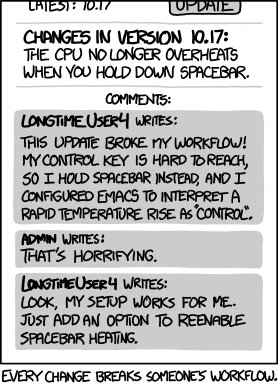
I don’t think mapping is a suitable solution, but below it someone told their own tragic story:
After a while struggling with this very problem with vnc viewer 4.1.3 under XP with a Debian lenny vnc4server 4.1.1+X4.3.0-31, this vim remapping is the only solution which work.
Okay, at least he found a solution.
